
funciona bien, repetiré

DeveloperMason
MASON War Thunder Cheat
- Working
- Reliability: excellent
- 5.0 · 10 reviews
- Checked 17 September
MASON calculates lead for moving targets, draws boxes on enemy vehicles and shows the distance to them. It starts from Steam or the Gaijin launcher in windowed mode.
 1 / 3
1 / 3
System requirements
- Windows
- Windows 10, Windows 11
- CPU
- Intel/AMD
- Game mode
- Windowed mode
- Game client
- Steam, Game launcher
- Disk format
- GPT
- BIOS
- UEFI BIOS, enable virtualization and Hyper-V, disable Secure Boot
What MASON can do
Aimbot5
- Enabled | Enable AIM
- AIM key | AIM key bind
- AIM radius | AIM radius
- AIM precision | AIM accuracy
- Moving adjustment | AIM lead adjustment for moving targets
ESP11
- Enabled | Enable ESP
- Plane ESP | ESP for aircraft
- Tank ESP | ESP for tanks
- Bot ESP | ESP for bots
- Bomb ESP | ESP for bombs
- Bounding box | Display a square on the enemy
- Vehicle name | Display the name of the enemy vehicle
- Show missiles | Display missiles/bombs
- Ignore spotted | Do not display spotted enemies
- Ignore team | Do not display the team
- Render distance | Maximum distance to display the enemy
Misc8
- Prediction (Tanks, planes, etc.) | Lead point (Planes, tanks, etc.)
- Prediction spot | Select a lead point (Turret, hull, etc.)
- HUD AIM Prediction | Enables the game engine's lead
- Show gun ballistics | Displays a crosshair indicating the projectile's impact (tanks only)
- Ship indicator | Projectile indicator for ships
- Gunner cam from sight | Enables machine gunner aiming
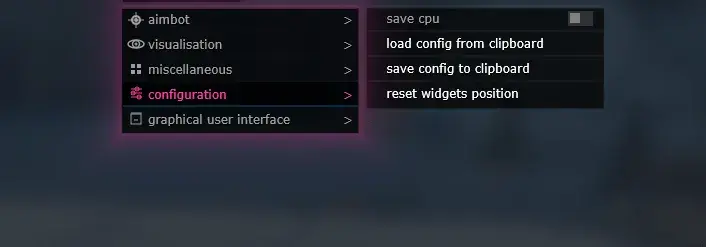
SOFT UI
- Hide overlay key | Hide overlay button
- Save cpu | Saves CPU resources
More about MASON
How MASON differs from other War Thunder builds
Before the first launch MASON sends you into the BIOS: it needs UEFI, Hyper-V virtualization enabled, Secure Boot disabled and a GPT disk. In return the War Thunder feature set is even and nothing extra:
- lead for moving vehicles;
- ESP boxes on enemy vehicles;
- distance to the target right on the marker;
- windowed mode, Steam and the Gaijin launcher.
There is no smoothed aim and no screen-capture protection here. Few settings, so it suits people who want to switch it on and play.
MASON reviews
5.010 reviews
solid build, would recommend
nice cheat
настроил по инструкции, доволен
топ сборка, рекомендую
seguí la guía y todo correcto
works fine, buying again
yep
всё работает, беру ещё
followed the setup guide, happy with it
Questions about buying
What do I need to set up in the BIOS for MASON?
UEFI mode, Hyper-V virtualization enabled, Secure Boot disabled and a GPT disk. These are requirements of the build, so it is worth meeting them before buying.
Which features does MASON have for War Thunder?
Lead for moving vehicles, ESP boxes and distance to the target. There is no smoothed aim and no radar in this build.
Which screen mode should I use?
Windowed only. Any client works, Steam or the Gaijin launcher, on Windows 10 or 11.