
после обновы игры тоже работает, доволен
DeveloperNN
NN Rob Run Cheat for ROB RUN
- Working
- Reliability: excellent
- 5.0 · 3 reviews
- Checked 12 November
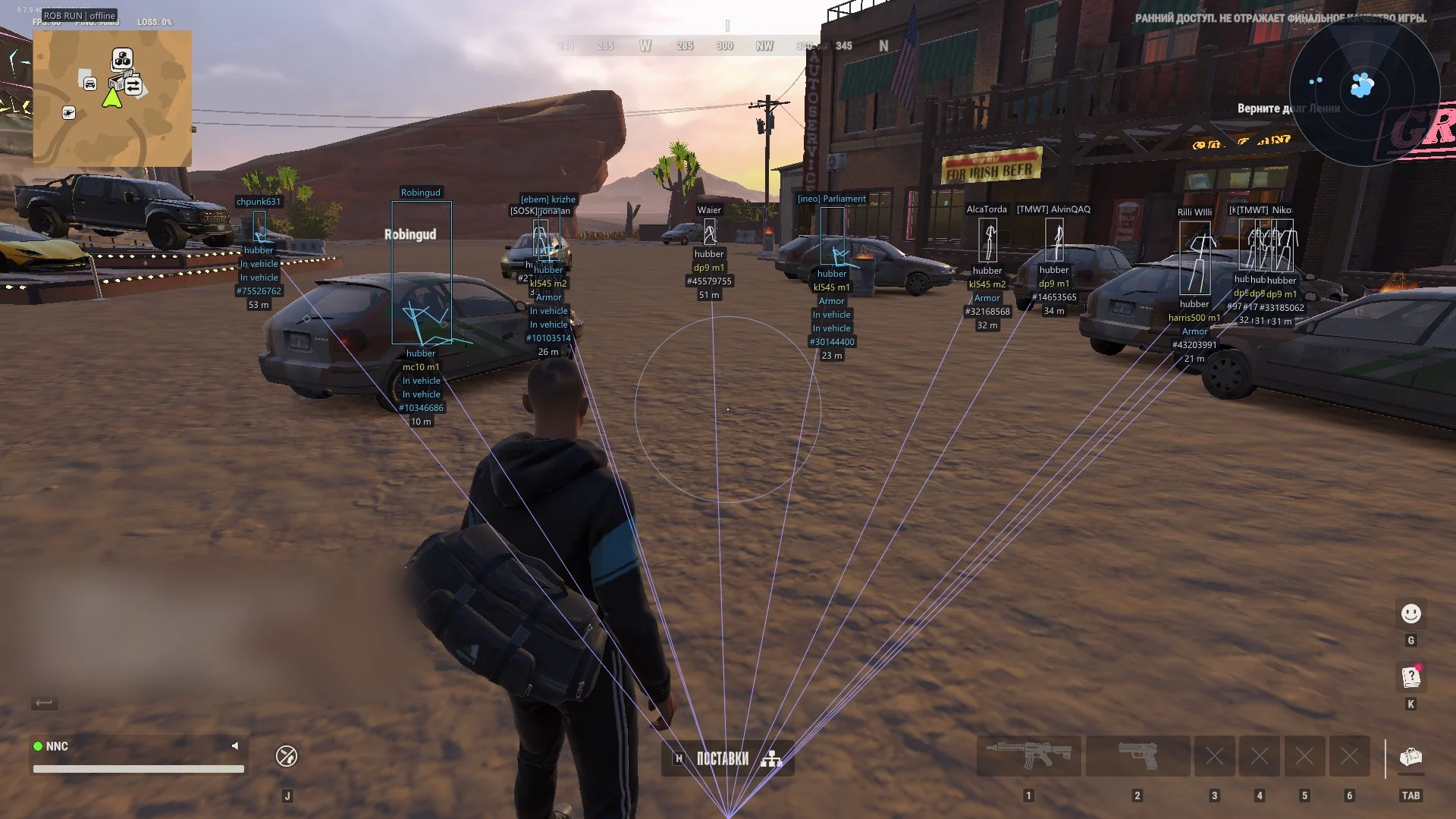
NN Rob Run is a ROB RUN cheat from the NN brand with a built-in offset scanner, Silent aim and weapon profiles. It suits players who don't want a game update to end their evening and who rob places watched by cameras.
 1 / 5
System requirements
- Windows
- Windows 10 / 11
- CPU
- Intel / AMD
- Game mode
- Window / Borderless
- Game client
- Steam
- Anti-cheat
- EAC (EasyAntiCheat)
- BIOS
- UEFI, GPT, Virtualization on, TPM off, Secure Boot off
What NN Rob Run can do
Aimbot6
- Weapon profilesseparate presets for pistols, rifles and everything else
- Silent aimfires without moving the camera, enemies don't see the snap
- Predictionadjustable strength for moving targets, crosshair marks the predicted point
- Bone selectionhead, neck, chest, pelvis or nearest bone
- Adaptive FOVsize in degrees with a zone that shrinks at longer range
- Target filterscops, robbers, civilians and others on separate toggles
ESP6
- Framesregular, cornered or 3D with fill and gradient
- Skeletonline thickness and head circle to taste
- Loot auto-coloringthe cheat pulls each item's rarity color from the game
- Vehiclesmodel name, driver, speed and condition
- Camerasview cones and colors for working, broken and alarm states
- Filtershide dead bodies, teammates and downed targets
Misc6
- Radarminimap with view-cone sectors and per-target filters
- Combat modehotkey hides the menu and leaves only damage numbers
- Recoil offplus spread and camera sway toggles in one place
- Offset scannerbuilt into the EXE, offsets pull on their own after patches
- Configssave by name and autosave on the fly
- Settings searchCtrl+F finds any option across the tabs
More about NN Rob Run
Offsets after a patch
The offset scanner sits inside the NN Rob Run EXE and pulls new offsets on its own after a patch. Early access updates shift game memory often, and most builds wait for a manual fix when that happens. A bigger change can still put NN Rob Run on update, but small patches are less likely to cost you a session. Compared with ARCANE it adds Silent aim; compared with FOCUS it swaps heist timers for weapon profiles and Ctrl+F settings search.
Bank job with the alarm on the door
Two of you at the vault, one on the safe door, one watching the hall. Camera ESP colors each camera working, broken or alarm, so you see which ones another crew already took out and which will give you away. Silent aim fires without turning the camera, handy when you're holding a corner and someone steps out of the stairwell. Combat mode hides the menu and leaves only damage numbers once shooting starts.
BIOS before the first launch
NN Rob Run asks for UEFI with a GPT disk, virtualization on, TPM off and Secure Boot off. Set those in BIOS first, then run it on Windows 10 or 11 in window or borderless mode.
Mid-wipe patches
Three days into a wipe a small patch drops, and builds without a scanner wait for their developer. That's the case NN Rob Run is set up for. It reads working with excellent reliability right now. Try one day first; if it fits, a 30-day key spans several wipes. A bigger update can still put it on update, and then checkout closes until the fix.
NN Rob Run reviews
5.03 reviews
Ça marche, rien à redire.
still working after the update, happy with it
Questions about buying
Does NN Rob Run work after a patch?
Usually, since the offset scanner picks up new offsets by itself. If the status shows on update, a bigger fix is underway and checkout stays closed until it's done.
What term should I buy for NN Rob Run?
Start with a day. Because small patches are handled by the scanner, 7 or 30 days make sense once you're sure.
Can other players see my aim snap with Silent aim?
Your camera doesn't move when Silent aim fires, so there's no visible snap on your view. Prediction marks the lead point for moving targets.
How do I find a setting quickly in NN Rob Run?
Ctrl+F searches every tab. Configs save by name and autosave as you change them, and combat mode has its own hotkey.