
läuft stabil, kaufe wieder

DeveloperFecurity
FECURITY Escape from Tarkov Cheat
- Working
- Reliability: good
- 4.9 · 7 reviews
- Checked 17 September
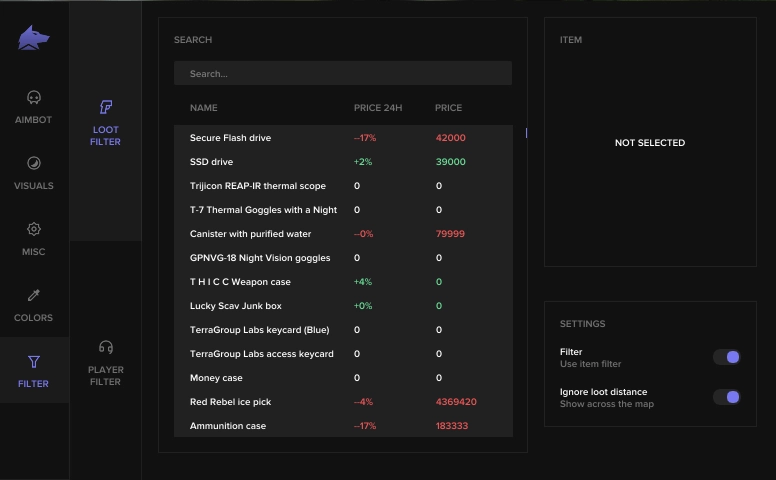
FECURITY highlights both players and loot with its price, removes recoil and spread, and ships with a spoofer. It fits anyone who wants to see what is worth grabbing right in the raid.
 1 / 4
1 / 4
System requirements
- Windows
- Windows 10 (21H2, 22H2), Windows 11
- CPU
- Intel 6th gen+
- Game mode
- Windowed, Borderless, Fullscreen
- Game client
- Game launcher
- Built-in spoofer
- Yes
- Disk format
- GPT
- BIOS
- UEFI only (Legacy does not work), disable Secure Boot
What FECURITY can do
Aimbot13
- Aimbot on/off (checkbox)
- Customizable field of view (0–15°)
- Show field of view
- Hide spread
- Silent knife
- Velocity and ballistics prediction
- Customizable aimbot distance
- Unique weak point sampling system
AUTO-FIRE
- Auto-fire on/off (checkbox)
- Auto-fire targets (bots, followers, bosses)
- Auto-fire point sampling type
- Auto-fire point sampling speed
- Auto-fire distance
ESP29
- VISUALS
PLAYERS
- Turn on/off visuals (checkbox)
- Only enemies (checkbox)
- Frames
- Frame outline
- OOF Arrows
- Out of sight arrow radius
- "Chams" (color model settings)
- Skeleton
LOOT
- Turn on/off loot highlighting (checkbox)
- 3D frames
- Quest assistant
- Minimum price
- Rare price
- Maximum distance of items
- Hotkey for highlighting items
MINES
- Turn on/off mine/sniper highlighting
- Show distance
- Filter
- Maximum distance
- Hotkey for border zone
EXITS
- Turn on/off highlighting of exit points
- Only open
- Information about exit point (distance, status)
- Hotkey for point exit
GRENADES
- Grenade backlight on/off
- Grenade information (timer, distance)
- Maximum distance
- Hot key for grenade backlight
Misc33
- Quick Search
- Quick Item Check
- Quick Container Opening
- Quick Ammo Loading/Unloading
- Dynamic Sight
- Thermal Vision
- Night Vision
- Ammo Panel
- Hit Sound
- Change Field of View
- No Jump Delay
- High Jump
- Jump Height Slider
- Adjustable Game Time (0–24h)
- Third Person and Third Person Hotkey
- Loot Through Walls
- Remove Visor
- Adjustable Recoil Compensation (0–100%)
- Adjustable Recoil Compensation Mode (Increase/Decrease Recoil)
- Infinite Stamina
- Grenade Throwing Force
- Instant ADS Sight
- No Weight
- No Inertia
- No Glitches
- No Fog
- Always Shooting
- Always Aiming
- No Physical Condition
LOOT FILTER
- Loot Filter On/Off
- Ignore Loot Distance
- Adjustable loot categories
- Setting items for each category
More about FECURITY
How FECURITY differs from other EFT builds
Loot shows up together with its price, so junk stays out of your backpack. Players get the same treatment. The full list:
- aim on bones;
- boxes, skeletons and distance on players;
- loot highlight with price;
- no recoil and no spread;
- a hardware spoofer.
The hardware is picky. UEFI only (Legacy does not work), a GPT disk, Secure Boot turned off and an Intel CPU from the 6th generation up.
FECURITY reviews
4.97 reviews
Support hat beim Start geholfen
Отменный чит! ESP работает стабильно, но aim иногда промахивается по бегущим — добавьте предикшн.
works fine, would buy again
всё запустилось с первого раза
советую, продлеваю не первый раз
support helped me get started
Questions about buying
Is loot shown with its price?
Yes. The build highlights loot and shows its price separately. Bone aim, boxes, skeletons and distance on players are there too.
What are the system requirements for FECURITY?
UEFI boot (Legacy will not work), a GPT disk, Secure Boot off and an Intel CPU from the 6th generation up. Windows 10 (21H2, 22H2) or Windows 11.
Does FECURITY work in windowed mode?
Yes. Windowed, frameless and fullscreen modes are supported, launched through the game launcher.