
Opponent Stats показывает химию и платформу соперника до матча в Rivals. Удобно решать, стоит ли играть.

DeveloperMonopol
MONOPOL TRAINER for EA FC 27
- Working
- Reliability: excellent
- 4.5 · 4 reviews
- Checked 15 October
MONOPOL TRAINER is the one FC 27 build, a menu for Ultimate Team on Windows. Below is who it fits, what it leaves out and which parts carry extra risk.
 1 / 4
1 / 4
System requirements
- Windows
- Windows 10-11 x64
- CPU
- Intel and AMD
- Game mode
- Borderless
- Game client
- Steam, EA app, Epic Games
What MONOPOL TRAINER can do
Aimbot6
- Opponent Statschemistry, rating and platform of your Division Rivals opponent
- Division Rivals Editchange your Division Rivals settings
- Green Time Finishingperfect timing on penalty kicks
- Draft Matchmakingget paired with opponents on 0 wins
- Instant Moments, Anti-AFK, Skip Pack Animationfaster objectives, no AFK kicks, instant pack openings
- Squad Battlesfreeze the ball, change difficulty, Legacy Defending, switch sides
Misc6
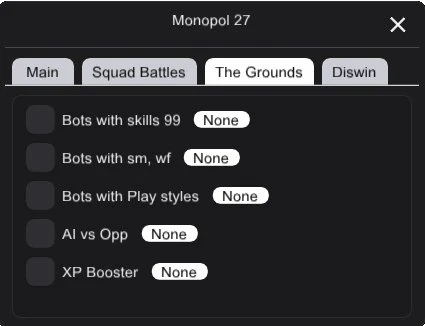
- AI vs Opponentlet the AI play your The Grounds matches
- Skill Botsbots with 99 skill stats, 5-star skill moves and weak foot
- PlayStyles Botsbots with PlayStyles unlocked
- XP Booster and Free Facilitiesfaster progression, Facilities at no cost
- Diswin (risky)Disconnect Win in Division Rivals after scoring a goal and in FUT Champions modes
- No Loss (risky)part of the Diswin block, flagged by the developer as risky
More about MONOPOL TRAINER
Who MONOPOL TRAINER Is For
FUT players on PC who want their evenings back. You need Windows 10-11 x64 on an Intel or AMD processor, the game set to borderless, and a copy bought on Steam, EA app or Epic Games. It fits someone who plays Rivals and Squad Battles every week and spends too long on packs, menus and bot matches. Console players and anyone after aim help in a shooter should look elsewhere.
What MONOPOL TRAINER Does and Does Not Do
FC 27 has just this one build, so the honest comparison is with playing without it. You gain:
- Opponent Stats and Division Rivals Edit;
- Squad Battles controls: ball freeze, difficulty, Legacy Defending, side swap;
- Skill Bots, PlayStyles Bots and AI vs Opponent for The Grounds;
- XP Booster and Free Facilities;
- Anti-AFK, Instant Moments, Skip Pack Animation and Green Time Finishing.
It does not aim or draw ESP, and it has no spoofer. AI vs Opponent covers The Grounds, not Rivals or Champions.
Status and Risk
Working, with reliability rated excellent. Read that rating as an estimate. Two features carry real extra danger, and the developer labels them that way: Diswin, which wins Rivals and Champions games by disconnecting after a goal, and No Loss in the same block. Leave both off if the account matters to you. Keys are 1, 7 or 30 days or lifetime. After a title update, see whether the status here changed before launching.
Before the First Session
Switch the game to borderless before you start the trainer, whichever launcher it came from. Then open Ultimate Team and turn on one tool at a time, starting with the ones that only cut waiting. That way, if something misbehaves after an update, you know right away which switch caused it.
MONOPOL TRAINER reviews
4.54 reviews
Squad Battles с заморозкой мяча и сменой сложности закрывает награды за неделю часа за два. Green Time на пенальти работает четко.
Opponent Stats in Division Rivals shows chemistry and platform before the match starts. Skill Bots with 99 stats are useful for practice.
Draft Matchmaking mit 0-Siege-Gegnern spart viel Nerven. Anti-AFK laeuft im Hintergrund ohne Probleme.
Questions about buying
Will it keep working after an EA patch?
Right now it is listed as working. A title update can stop it for a while, and then this page shows updating until the developer releases a fix.
What key length makes sense?
Start with one day and run a Rivals session plus Squad Battles. If it fits your routine, 7 or 30 days, or lifetime if you play FUT the whole year.
What can MONOPOL TRAINER not do?
It has no aim assist or ESP of any kind, and AI vs Opponent only plays The Grounds matches. It will not play Division Rivals for you.
Which settings should I turn on first?
Begin with the ones that only save time: Skip Pack Animation, Instant Moments, Anti-AFK and Opponent Stats. Keep Diswin and No Loss off, and add Squad Battles tools once you see how the trainer behaves.