

работает без проблем

DeveloperMason
MASON DayZ Cheat
- Working
- Reliability: excellent
- 5.0 · 10 reviews
- Checked 17 September
MASON leads moving targets: bone aim with prediction, plus skeletons, loot and distance on screen. The overlay stays out of recordings, and the BIOS needs a few settings first.
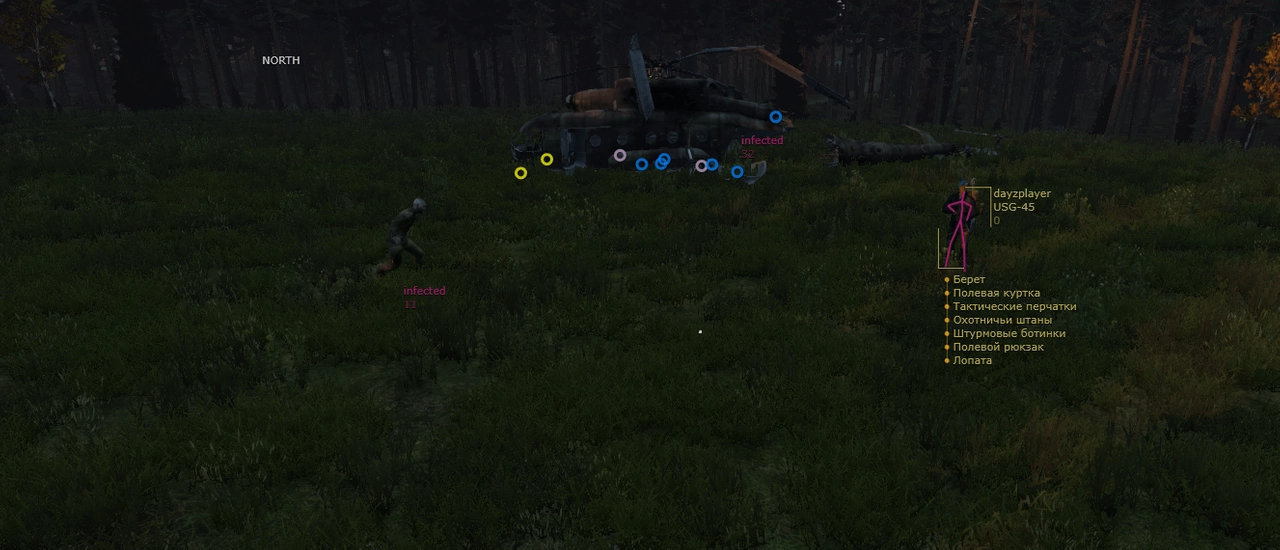 1 / 3
1 / 3
System requirements
- CPU
- Intel/AMD
- Game mode
- All
- Game client
- Steam
- Bypasses recording
- Yes
- Windows
- Windows 10 (2004 / 20H2 / 21H1 / 21H2 / 22H2), Windows 11 (21H2 / 22H2)
- BIOS
- UEFI BIOS, enable virtualization, disable Secure Boot
What MASON can do
Aimbot5
- enable aimbot
- aimbot trigger button
- aimbot aiming radius
- enable random bone selection for aimbot
- automatic switching to next target within aimbot aiming radius
ESP25
- ESP enable
- display square on enemy
- display name
- display player skeleton
- display current player weapon
- display distance to player
- display lead point (up to 500 meters)
- bind to display player inventory contents
- bind to display all cities and settlements on Chernarus map
- display zombies
- display animals
- display equipment
- display loot
- display items on ground
- display weapons on ground
- display everything for weapons (modules, stores, etc.)
- display food and drinks
- display medical supplies (blood bags, bandages, etc.)
- display various equipment, backpacks and armor
- display corpses
- display various structures
- display helicopter crash sites, as well as car accidents
- display magnetic north (like on a compass)
- loot display distance limit
- player display distance limit
Misc9
ADDITIONAL
- enable other functionality
- enable permanent day
- disable display of grass, bushes
- change aspect ratio
BINDS
- bind to display menu
- bind to hide all visuals except players
- slow down the cheat, reducing the load on the processor
- display aimbot radius
- display crosshair
More about MASON
What makes MASON different from other DayZ builds
Want aim that leads a running player instead of trailing behind? Look at MASON: bones plus prediction, with skeletons, ground loot and distance to every target on top. No boxes, no radar, no smoothing, so the set stays lean.
Check the BIOS before buying:
- boot in UEFI mode;
- virtualization enabled;
- Secure Boot disabled.
Any game mode works. Windows 10 (2004 through 22H2) and Windows 11 (21H2, 22H2) are supported.
MASON reviews
5.010 reviews
todo bien, repetiré
Чит хороший, стреляет за меня. Всё нравится, банов ноль.
поддержка помогла с запуском
solid, will renew
works as described, happy with it
funciona bien, lo recomiendo
взял, пока всё норм
el soporte me ayudó a arrancar
support helped me get it running
Questions about buying
What do I change in the BIOS for MASON?
Boot in UEFI mode, turn virtualization on and turn Secure Boot off. These are the build's requirements, so check all three before launching.
Does MASON have prediction?
Yes. The bone aim leads moving targets. There is no smoothing, visibility check or radar in this build.
Which systems and game modes work?
Windows 10 (2004, 20H2, 21H1, 21H2, 22H2) and Windows 11 (21H2, 22H2), an Intel or AMD processor and DayZ from Steam. Any game mode.